
 Free Delivery On Orders Over $180
 Same Day Delivery
 Click & Collect
 Installment Payment
 Store Locations
 eGift Card
Buy Microphones & Webcams
-
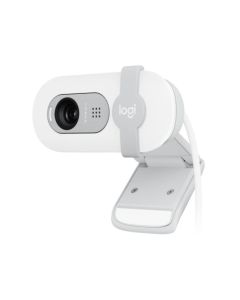
 Logitech Brio 100 Webcam - Off-White 960-001618
960-001618
FULL HD (1080/30FPS)Add to Wish ListSGD50.00 U.P. SGD59.00 BLACK FRIDAY SALE - 6% OFFOut of stock -
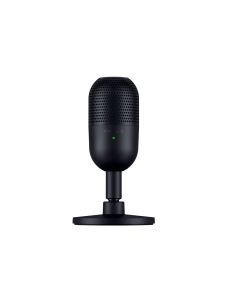 Razer Seiren V3 Mini Microphone - Black RZ19-05050100-R3M1
RZ19-05050100-R3M1
USB-AAdd to Wish ListSGD66.00 U.P. SGD75.00 BLACK FRIDAY SALE - 6% OFFOut of stock -
 Logitech G Blue Yeti Nano USB Gaming Microphone - Blackout 988-000502
988-000502
Add to Wish ListSGD106.00 U.P. SGD159.00 BLACK FRIDAY SALE - 6% OFFOut of stock
Microphones and Webcams: What's the Difference?
Microphones and webcams come in different types for gamers, streamers and video caller s.
| Type | Best For |
|---|---|
| USB Microphones | Streaming, podcasting and voice or video calls where audio quality matters. |
| Gaming Microphones | Gaming and streaming setups that want RGB lighting and a USB connection with little delay. |
| Webcams | Video calls, streaming and content creation, from 720p up to Full HD. |
| Wireless Mics | Events and presentations that need a handheld or clip-on mic with no cable. |
How To Choose a Microphone or Webcam
A microphone's sound depends on its polar pattern, connection and sensitivity, while a webcam's picture depends on resolution, field of view and autofocus.
How to choose a microphone
| What To Compare |
Why It Matters |
What To Check |
|---|---|---|
| Polar Pattern | Sets which direction the microphone picks up sound from. | Cardioid isolates a single source, omnidirectional captures the whole room. |
| Frequency Response | A wider range picks up more detail in voices and instruments. | Check the stated range in Hz against the microphone's spec sheet. |
| Connectivity | Determines if the microphone works with your device. | USB suits most desktops, XLR needs an audio interface, 3.5mm suits basic setups. |
| Sensitivity | Higher sensitivity picks up subtle detail in quiet recordings. | Check the sensitivity rating in dB against your recording environment. A figure closer to zero, such as ‑30 dB rather than ‑40 dB, means a more sensitive microphone. |
| Noise Cancellation | Reduces background noise during gaming and calls. | Look for built-in noise cancellation or a cardioid pattern that limits pickup. |
How to choose a webcam
| What To Compare |
Why It Matters |
What To Check |
|---|---|---|
| Resolution and Frame Rate | Higher figures mean sharper, smoother video. | 720p suits basic calls, 1080p at 30fps suits streaming and content creation. |
| Field of View | A wider angle fits more of the room in the frame. | Check the diagonal field of view against your desk setup. |
| Autofocus | Keeps the image sharp when you move during a call or stream. | Look for continuous autofocus rather than a fixed-focus lens. |
| Built-In vs External Mic | Decides whether you need a separate microphone for good audio. | Built-in mics suit casual calls, external mics suit streaming and recording. |
Microphone & Webcam Prices in Singapore
Microphone and webcam prices in Singapore vary by brand, features and connection type. Webcams for PCs start at around S$40 for a basic HD model and go up to S$141 for Logitech's Full HD Brio. Microphones start at around S$72 for an entry USB model and go up to S$199 for Logitech’s G Blue Yeti.
Prices are indicative and may vary by model and ongoing promotions. Prices are subject to change based on demand and availability.
Why Buy Microphones & Webcams at Gain City?
Gain City carries microphones and webcams in Singapore for gaming, streaming and video calls. Here's why you should buy your next mic or webcam from us:
- Competitive Pricing: We offer competitive mic and webcam prices in Singapore from reputable brands like Asus, JBL, Logitech, and Razer.
- Fast, Reliable Delivery: We offer fast, reliable delivery across Singapore.
- Comprehensive Warranty: Add longer cover to your microphone or webcam with our extended warranty options.
Frequently Asked Questions About Gaming Microphones and Webcams
How do I choose the right microphone for my needs?
Choose a microphone for how you will use it. Gaming microphones focus on noise cancellation, podcasting and streaming mics need a wide frequency response and a cardioid pattern, and calls only need easy setup.
A USB microphone connects straight to a computer, while an XLR microphone needs a separate audio interface. Price then narrows your choice, since it follows features such as adjustable gain and RGB lighting as well as sound quality.
What's the difference between a cardioid and an omnidirectional microphone?
A cardioid microphone picks up sound mainly from the front and rejects noise from the sides and rear, which makes it the better choice for solo streaming, gaming voice chat and podcasting.
An omnidirectional microphone picks up sound evenly from all directions, which suits group recordings or round-table talks. Most gaming and streaming mics use a cardioid pattern for this reason.
Do I need a separate microphone if my PC webcam has a built-in one?
Not for casual video calls, as the built-in microphone on a PC webcam is usually clear enough.
For streaming, podcasting and recording, get a separate USB or XLR microphone, since webcam mics pick up more room noise. A dedicated gaming microphone with a cardioid pattern also keeps your voice clear of keyboard and fan noise.
What resolution webcam do I need for streaming on my PC?
Full HD 1080p at 30fps is a good starting point for streaming, and it stays sharp without using too much upload bandwidth. A 720p webcam is fine for video calls but looks softer on a stream. Frame rate matters as much as resolution, because a low frame rate makes movement look choppy.
Can I use a gaming microphone for professional recording?
Yes, for casual recording, voiceover and podcasting, especially with USB models that have a cardioid pattern and a wide frequency response. Studio and broadcast work is better served by an XLR microphone through a dedicated interface, which gives finer gain control. For most home content creation, a good gaming or USB streaming mic is enough.
Do all gaming microphones and webcams come with a warranty?
Yes. Every microphone and webcam sold at Gain City comes with a manufacturer's warranty, and the term varies by brand and model. Extended coverage is available on eligible IT accessories for up to three years.